Package Information
Available Nodes
Documentation
n8n-nodes-microsoft-partner-gdap
n8n node to integrate with Microsoft Graph API via GDAP (Granular Delegated Admin Privileges)
This node allows Microsoft Partners to access customer tenant data through a single set of credentials, leveraging GDAP relationships to query Microsoft Graph API across multiple customer tenants.
WARNING: This is beta. Features are limited and under active development. It is only accessible by the beta tag.
Workflow Examples
More info at https://mspcopilot.io/n8n-nodes/microsoft-partner-gdap
Workflow examples coming at https://mspcopilot.io/n8n-workflows
Current Features
Microsoft Graph GET operations: Read data from any Microsoft Graph API endpoint across your customer tenants.
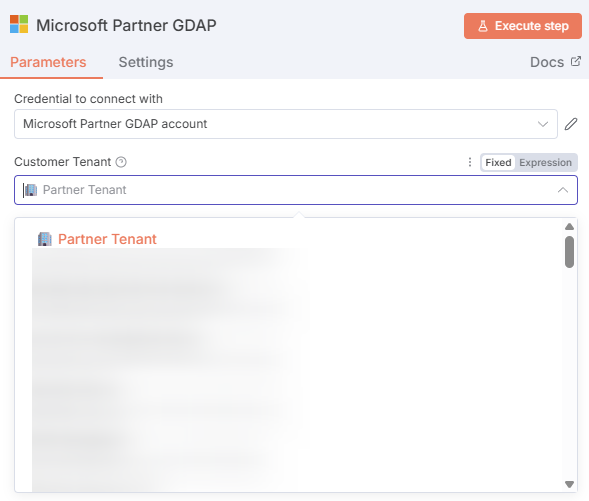
Tenant dropdown selection: Easily select from your partner tenant or any customer tenant with GDAP relationships.
In-memory OAuth token caching: Optimizes workflow performance by reducing authentication overhead.
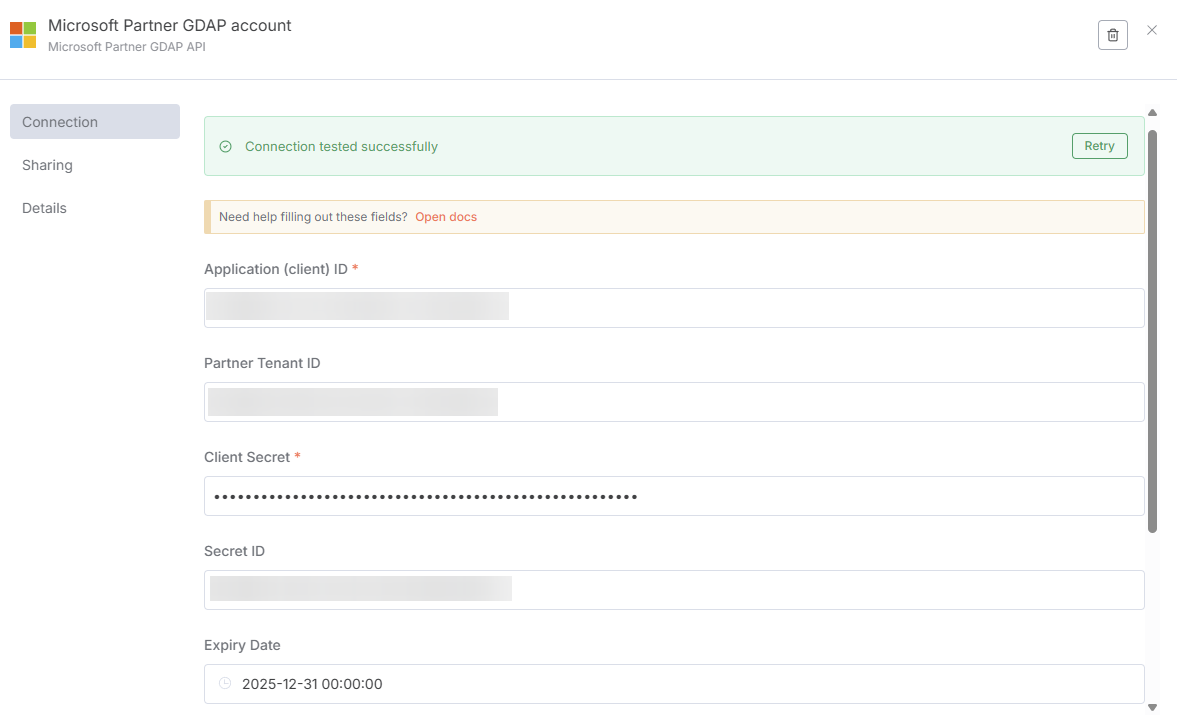
Single credential setup: You only need to enter your partner credentials once to make calls to any customer tenant.
Installation
Note: This node is currently only available as a beta release. Install using the @beta tag.
Follow the installation guide in the n8n community nodes documentation.
Install directly in n8n:
- Go to Settings > Community Nodes
- Select Install
- Enter
@mspcopilot/n8n-nodes-microsoft-partner-gdap@beta - Agree to the risks and install
Operations
Currently supports:
- Microsoft Graph GET requests: Query any Microsoft Graph API endpoint (v1.0 or beta)
- Multi-tenant access: Access your partner tenant or any customer tenant with GDAP relationships
- Automatic authentication: OAuth token management and caching handled automatically
Credentials
Prerequisites
- You need a Microsoft Partner Center account with GDAP relationships to customer tenants
- Create an Azure AD application in your partner tenant with the following:
- Required API permissions (depending on what you want to access)
- A client secret or certificate
- GDAP relationships configured with appropriate security groups
Setting up credentials
- In n8n, create new credentials for Microsoft Partner GDAP API
- Enter your partner tenant details:
- Partner Tenant ID: Your partner organization's Azure AD tenant ID
- Client ID: Application (client) ID from your Azure app registration
- Client Secret: Client secret from your Azure app registration
- Save and test the credentials
Important: Create a dedicated Azure application for n8n with only the permissions you need. Follow the principle of least privilege when assigning GDAP security groups.
Compatibility
- Minimum n8n version: 0.190.0
- Tested with n8n versions: 1.0+
Usage
Basic workflow
- Add the Microsoft Partner GDAP node to your workflow
- Select or create credentials
- Choose a Customer Tenant from the dropdown (includes your partner tenant)
- Select the Service (currently Microsoft Graph only)
- Enter the Endpoint URI (e.g.,
/v1.0/usersorhttps://graph.microsoft.com/v1.0/users)
Example endpoints
- Get all users:
/v1.0/users - Get a specific user:
/v1.0/users/{user-id} - List subscriptions:
/v1.0/subscriptions - Get organization details:
/v1.0/organization - List groups:
/v1.0/groups
Tips
- You can use expressions for the tenant ID to dynamically select tenants
- The endpoint can be a path (e.g.,
/v1.0/users) or a full URL - Array responses are automatically split into individual items for downstream processing
- Enable "Continue on Fail" in node settings to handle errors gracefully when processing multiple items
Roadmap
Coming Soon
- POST, PATCH, DELETE operations
- Additional Microsoft services beyond Graph API
- Batch request support
- More authentication options
- Enhanced error handling and retries
Future
- Auto-detection of required permissions
- Built-in pagination handling
- Common operation templates (create user, reset password, etc.)
- Integration with other MSP tools
Looking for Beta Testers
This node is actively seeking feedback! If you're an MSP or Microsoft Partner using n8n, we'd love to hear what features you need most.
Resources
- n8n community nodes documentation
- Microsoft Graph API documentation
- GDAP documentation
- MSP Copilot website
Version History
0.0.1 (Beta)
- Initial release
- Microsoft Graph GET operations only
- OAuth token caching
- Tenant selection via dropdown
- Basic error handling
License
This project is licensed under the Sustainable Use License (SUL-1.0).
Copyright (c) 2025 MSP Copilot
You are free to use, copy, modify, merge, publish, distribute, and/or sublicense this software, with the restriction that you may not use it to provide a commercial SaaS product or service that competes with this project.
See LICENSE.md for the full license text.