Package Information
Downloads: 2 weekly / 25 monthly
Latest Version: 0.3.0
Author: sungaowei
Available Nodes

Documentation
n8n-nodes-gitea-full
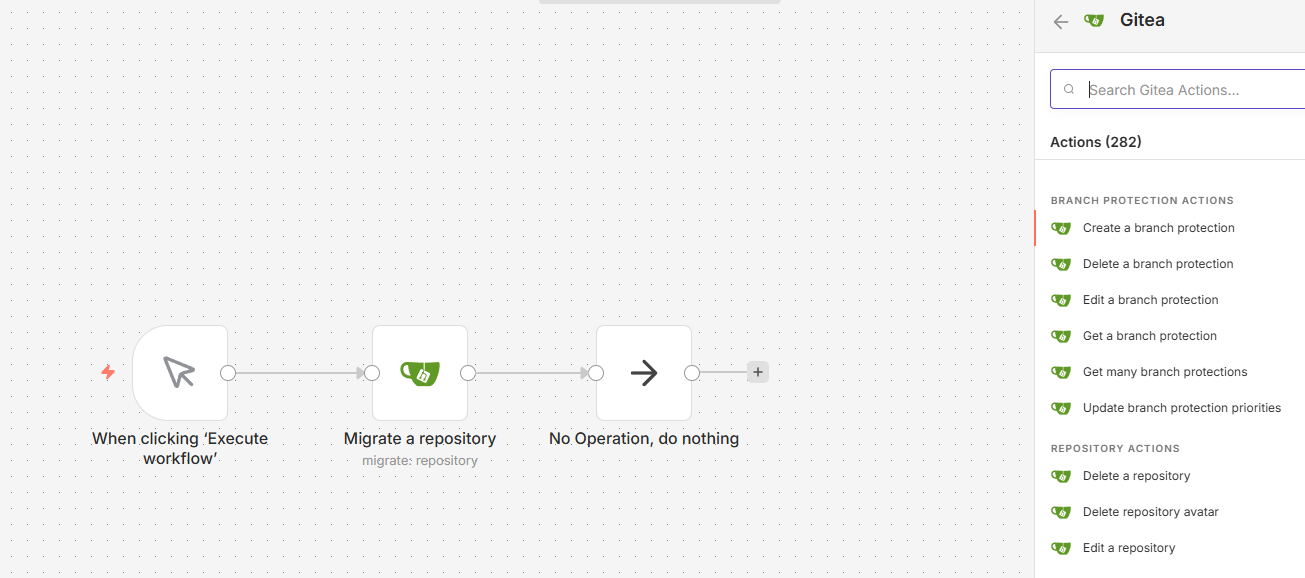
This is an n8n community node that provides a comprehensive integration with Gitea. It implements all API endpoints compatible with Gitea version 1.25, allowing you to automate almost every aspect of your Gitea instance.
Disclaimer: This is an unofficial community node. It is not affiliated with, endorsed by, or associated with Gitea or the Gitea project. The Gitea logo and trademarks used in this project are the property of their respective owners.
n8n is a fair-code licensed workflow automation platform.
Features
This node covers a wide range of Gitea resources:
- Repository: CRUD operations, migration, search, branching, branch protection, collaborators, and commits.
- Issue: Complete issue management including comments, labels, milestones, dependencies, blocking, stopwatch, tracked time, subscriptions, reactions, and attachments.
- Organization: Manage organizations, members, teams, and organizational repositories.
- User: Manage profile settings, public/GPG keys, blocks, emails, followers, hooks, and OAuth2 applications.
- Package: Support for Gitea package registry (Container, NPM, Maven, PyPI, Go, etc.).
- Notification: View and manage notification threads.
- Admin: System-wide administration including cron tasks, system hooks, user/org management, and unadopted repositories.
- Repository Actions: Manage Gitea Actions artifacts, jobs, runs, runners, secrets, and variables.
- ActivityPub: Basic ActivityPub support.
- Miscellaneous: Markdown/Markup rendering, templates (gitignore, label, license), and system info.
Installation
n8n UI
- Go to Settings > Community Nodes.
- Click on Install a next node.
- Enter
n8n-nodes-gitea-fullin the Enter npm package name field. - Agree to the risks and click Install.
CLI
For Docker-based installations:
npm install n8n-nodes-gitea-full
Credentials
To use this node, you'll need a Gitea API Token:
- Log in to your Gitea instance.
- Go to Settings > Applications.
- Under Manage Access Tokens, enter a name and click Generate Token.
- Copy the generated token.
- In n8n, create a new Gitea API credential and paste your Base URL (e.g.,
https://gitea.com) and Access Token.
Compatibility
- Developed and tested against Gitea 1.25.
- Requires n8n version 1.0.0 or higher.