Package Information
Available Nodes


Documentation
n8n-nodes-trusera


n8n community node package that scans your workflows for AI security risks using Trusera AI-BOM.
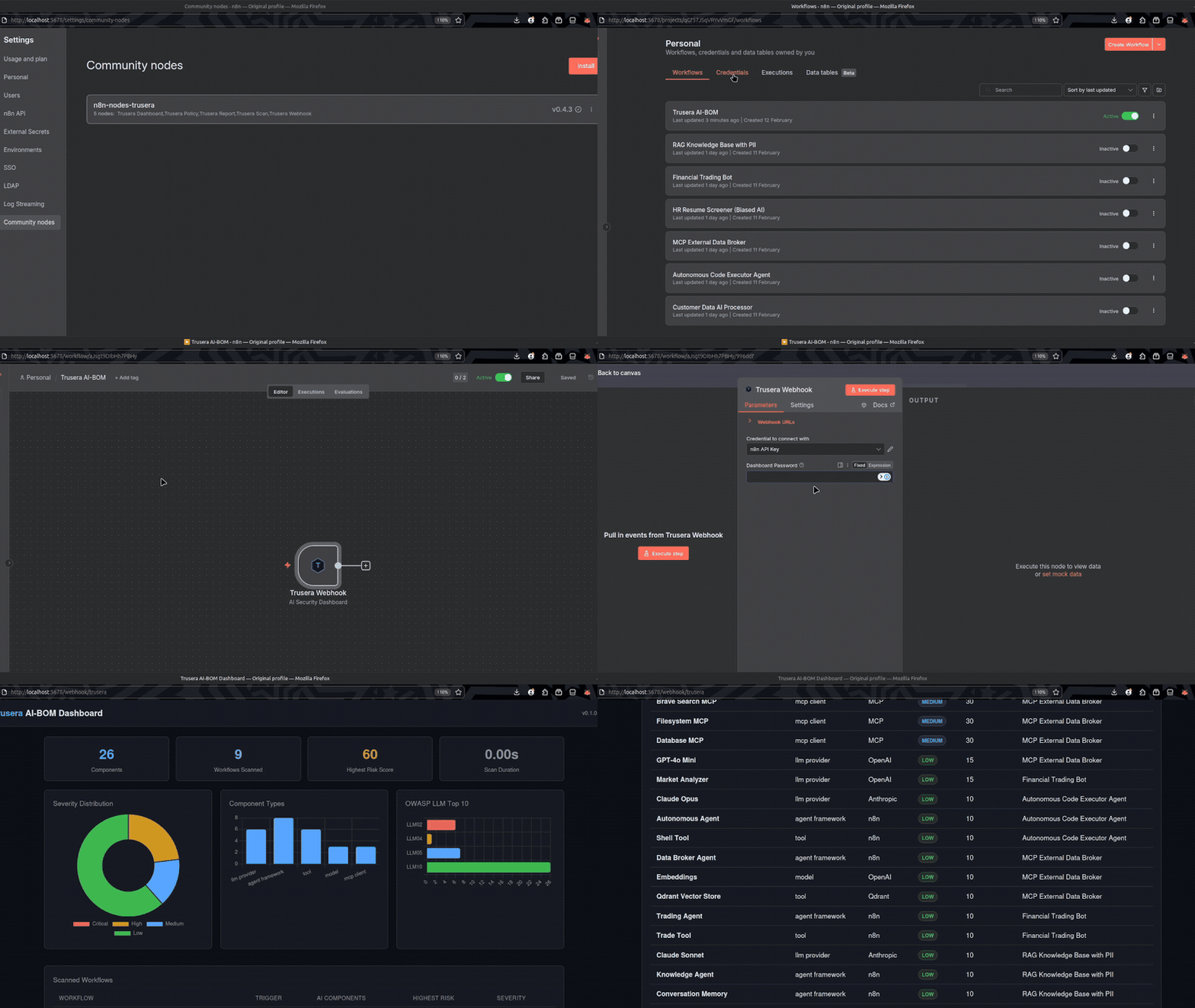
Drop a single node, activate, and visit /webhook/trusera to see a full interactive security dashboard of every AI component in your n8n instance.
Installation
In your n8n instance:
- Go to Settings > Community Nodes
- Enter
n8n-nodes-trusera - Click Install
Or install manually via CLI:
cd ~/.n8n/nodes
npm install n8n-nodes-trusera
# Restart n8n
Quick Start (1 minute)
The Trusera Webhook node gives you a full security dashboard with zero configuration:
- Create a new workflow
- Add the Trusera Webhook node
- Add your n8n API credential (Settings > n8n API > Create API Key)
- Activate the workflow
- Visit
http://your-n8n-url/webhook/trusera
That's it. One node, full dashboard.
Nodes
This package includes 5 nodes for different use cases:
Trusera Webhook (Recommended)
The one-node solution. This is what most users need.
| Type | Trigger (webhook) |
| Credential | n8n API (required) |
| URL | /webhook/trusera |
| Method | GET |
Self-contained trigger node that:
- Fetches all workflows from your n8n instance via the REST API
- Scans every workflow for AI components and security risks
- Serves an interactive HTML dashboard directly at
/webhook/trusera
Parameters:
| Parameter | Type | Default | Description |
|---|---|---|---|
| Dashboard Password | string | (empty) | Optional. If set, the dashboard is AES-256-GCM encrypted and visitors must enter this password to view it. |
Setup:
[Trusera Webhook] → (no other nodes needed)
Trusera Dashboard
Use this if you already have a built-in Webhook node configured and want to chain it.
| Type | Action |
| Credential | n8n API (required) |
| Input | Any trigger |
| Output | { html, headers, statusCode, body } |
Fetches all workflows, scans them, and returns an HTML dashboard as output. Designed to connect after a built-in n8n Webhook node for custom webhook setups.
Parameters:
| Parameter | Type | Default | Description |
|---|---|---|---|
| Dashboard Password | string | (empty) | Optional AES-256-GCM encryption password. |
Setup:
[Webhook (GET /dashboard, responseMode: lastNode)] → [Trusera Dashboard]
Configure the Webhook node with:
- Response Mode:
Last Node - Response Content Type:
text/html - Response Data:
First Entry JSON - Response Property Name:
html
Trusera Scan
Use this for programmatic scanning — pipe workflow JSON in, get structured results out.
| Type | Action |
| Credential | n8n API (optional) |
| Input | Workflow JSON |
| Output | Components array with risk scores |
Scans workflow JSON for AI components and returns structured scan results. Use this when you want to process scan results programmatically (e.g., send Slack alerts, store in a database, trigger CI/CD gates).
Operations:
| Operation | Description |
|---|---|
| Scan Workflow JSON | Scan a single workflow JSON from input |
| Scan Multiple Workflows | Scan an array of workflow JSONs |
Parameters:
| Parameter | Type | Default | Description |
|---|---|---|---|
| Workflow JSON Field | string | json |
Input field containing the workflow JSON |
| Workflows Array Field | string | workflows |
Input field containing the workflows array |
| File Path | string | workflow.json |
Identifier for the workflow in results |
Setup:
[HTTP Request (GET /api/v1/workflows)] → [Trusera Scan] → [Slack / Email / DB]
Output example:
{
  "components": [
    {
      "name": "GPT-4o Agent",
      "type": "llm_provider",
      "provider": "OpenAI",
      "modelName": "gpt-4o",
      "risk": { "score": 45, "severity": "medium", "factors": [...] },
      "flags": ["no_error_handling", "unpinned_model"]
    }
  ],
  "totalComponents": 1
}
Trusera Policy
Use this to enforce security gates — block deployments with critical findings.
| Type | Action |
| Input | Scan results from Trusera Scan |
| Output | { passed: boolean, violations: string[] } |
Evaluates scan results against configurable security policies. Chain after Trusera Scan to implement CI/CD security gates.
Parameters:
| Parameter | Type | Default | Description |
|---|---|---|---|
| Scan Result Field | string | (empty) | Field containing scan result (empty = entire input) |
| Max Critical | number | 0 |
Maximum critical-severity components allowed |
| Max High | number | -1 |
Maximum high-severity components (-1 = unlimited) |
| Max Risk Score | number | -1 |
Maximum risk score for any component (-1 = unlimited) |
| Block Providers | string | (empty) | Comma-separated provider blocklist (e.g., OpenAI,Anthropic) |
| Block Flags | string | (empty) | Comma-separated flag blocklist (e.g., hardcoded_api_key,no_auth) |
Setup:
[Trusera Scan] → [Trusera Policy] → [IF passed] → [Deploy] / [Alert]
Output example:
{
  "passed": false,
  "violations": [
    "Found 2 critical components (max: 0)",
    "Blocked provider: OpenAI"
  ],
  "totalComponents": 15
}
Trusera Report
Use this to generate human-readable reports for Slack, email, or documentation.
| Type | Action |
| Input | Scan results from Trusera Scan |
| Output | Markdown or JSON report |
Generates formatted security reports from scan results.
Parameters:
| Parameter | Type | Default | Description |
|---|---|---|---|
| Scan Result Field | string | (empty) | Field containing scan result (empty = entire input) |
| Format | options | markdown |
markdown or jsonSummary |
| Include Low Severity | boolean | false |
Whether to include low-severity findings |
Setup:
[Trusera Scan] → [Trusera Report] → [Send Email / Slack Message]
Credentials
n8n API
The Trusera nodes connect to your n8n instance's own REST API to fetch workflows.
| Field | Description |
|---|---|
| API Key | Your n8n API key (Settings > n8n API > Create API Key) |
| n8n Base URL | URL of your n8n instance (default: http://localhost:5678) |
What It Detects
The scanner identifies AI components across your workflows:
- LLM Providers — OpenAI, Anthropic, Google Gemini, Mistral, Groq, Ollama, Azure OpenAI, AWS Bedrock, Cohere, HuggingFace
- Agent Frameworks — n8n AI agents, LangChain chains, ReAct agents
- Tools — Code execution nodes, HTTP request tools, vector stores (Pinecone, Qdrant, Weaviate, ChromaDB, Supabase)
- MCP Clients — Model Context Protocol connections to external servers
- Models — Embedding models, chat models, completion models
- Memory — Buffer memory, conversation memory, session-based memory
Risk Flags
| Flag | Weight | Description |
|---|---|---|
hardcoded_api_key |
30 | Hardcoded API key in workflow JSON |
hardcoded_credentials |
30 | Hardcoded credentials in node parameters |
code_http_tools |
30 | Agent with both code execution and HTTP request tools |
shadow_ai |
25 | AI dependency not declared in project files |
webhook_no_auth |
25 | Webhook trigger without authentication |
internet_facing |
20 | AI components exposed to internet via webhook |
multi_agent_no_trust |
20 | Multi-agent system without trust boundaries |
agent_chain_no_validation |
20 | Agent-to-agent chain without output validation |
mcp_unknown_server |
20 | MCP client connected to unknown/external server |
no_auth |
15 | AI endpoint without authentication |
no_rate_limit |
10 | No rate limiting on AI endpoint |
deprecated_model |
10 | Using a deprecated AI model version |
no_error_handling |
10 | No error handling configured for AI calls |
unpinned_model |
5 | Model version not pinned to specific release |
Severity Thresholds
| Severity | Score Range | Color |
|---|---|---|
| Critical | 76 - 100 | Red |
| High | 51 - 75 | Orange |
| Medium | 26 - 50 | Blue |
| Low | 0 - 25 | Green |
Dashboard Features
The interactive HTML dashboard includes:
- Summary cards — total components, workflows scanned, highest risk score, scan duration
- Severity distribution chart — donut chart showing critical/high/medium/low breakdown
- Component types chart — bar chart of LLM providers, agents, tools, models, MCP clients
- OWASP LLM Top 10 chart — risk flags mapped to OWASP categories
- Scanned workflows table — each workflow with trigger type, AI component count, highest risk, severity badge
- Findings table — all detected components with name, type, provider, severity, risk score, workflow
- Filters — search by name, filter by severity/type/workflow
- Export — CSV and JSON export buttons
- Dark/light mode — toggle in the header
- Password protection — optional AES-256-GCM encryption
Example Workflows
Minimal: Security Dashboard
[Trusera Webhook] → activate → visit /webhook/trusera
CI/CD Gate: Block Risky Deployments
[Schedule Trigger] → [HTTP Request: GET /api/v1/workflows]
                    → [Trusera Scan]
                    → [Trusera Policy (maxCritical: 0)]
                    → [IF: passed = true]
                        → Yes: [Deploy]
                        → No: [Slack Alert]
Weekly Report: Email Summary
[Schedule Trigger (weekly)] → [HTTP Request: GET /api/v1/workflows]
                             → [Trusera Scan (scanMultiple)]
                             → [Trusera Report (markdown)]
                             → [Send Email]
License
MIT